The Real Problem with Figma-to-After-Effects Workflows
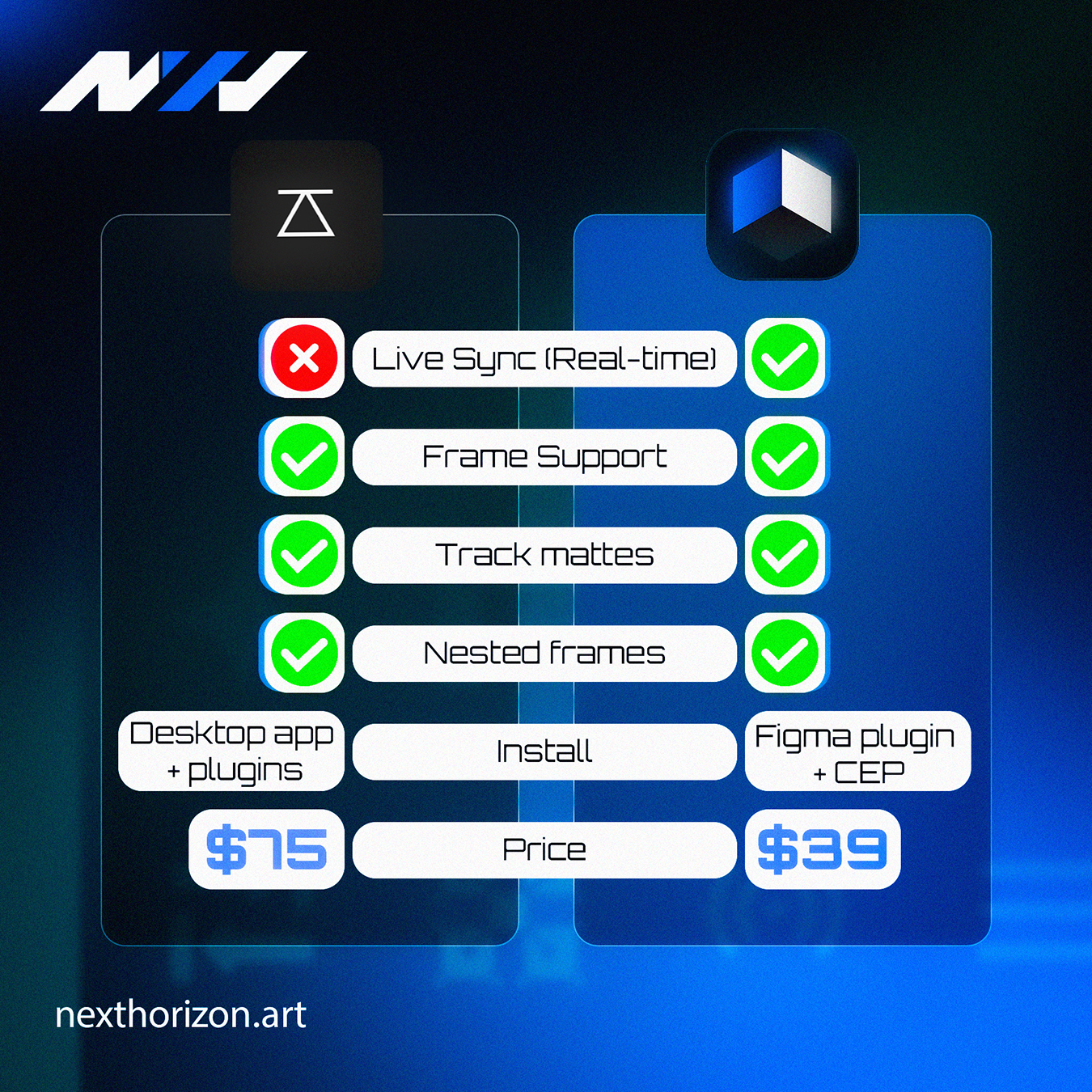
Prism vs Overlord is a comparison that matters more than most people admit. Prism wins for teams that need real-time design updates to reflect instantly in After Effects, because its Automatic Live Sync feature eliminates the manual re-import step that kills momentum on fast-moving projects. Overlord is still solid, but it does not offer this kind of live connection between the two apps.
I know the feeling of finishing a motion piece, sending it to the client, and then getting a Slack message that says "can we just tweak the logo placement and change that blue to our new brand color?" Cool. No problem. Except you are now back in Figma, making the change, exporting again, re-importing into After Effects, realigning everything that shifted, and re-rendering. That whole process can eat 45 minutes on a good day.
That is the problem both of these tools are trying to solve. The question is how well they actually solve it.
What Overlord Actually Does Well
I want to be fair here because Overlord has been around long enough to earn real respect in the motion design community. It handles vector transfers from Illustrator to After Effects cleanly. The shapes come in as editable path layers, the structure makes sense, and for a lot of studios it just works.
Where it falls short is in the feedback loop. Overlord is essentially a one-way transfer tool. You push assets over, they land in After Effects, and that is it. If your designer updates the source file, you are starting the transfer again manually. For a single freelancer working alone, that might be fine. For a team where the designer and the animator are two different people working simultaneously, it gets painful fast.
The gap between a design update and an animation update should be measured in seconds, not in Slack messages and re-import cycles.
Why Automatic Live Sync in Prism Is a Bigger Deal Than It Sounds
Prism is a Figma plugin that bridges directly into After Effects, and the feature that makes it stand out is Automatic Live Sync. When it is active, any change you make in your Figma file pushes through to your After Effects composition in real time. No manual re-import. No "hey can you send me the updated file" messages. The motion designer sees the update happen while they are working.
This is not a small convenience. It changes how teams collaborate. A designer can be refining spacing and color while an animator is already building transitions on the same elements. The two workflows stop blocking each other.
Prism starts at $39, which you can check out over at the Prism product page. For what it eliminates in wasted back-and-forth time, that is not a difficult investment to justify.
Prism vs Overlord: A Direct Comparison
Before I give you my take, here is a straight look at how these two tools sit next to each other across the features that matter most for real production work:
| Feature | Prism | Overlord |
|---|---|---|
| Source App | Figma | Adobe Illustrator |
| Automatic Live Sync | Yes, real-time | No |
| Transfer Direction | Two-way with sync | One-way push |
| Team Collaboration | Strong, built for it | Better for solo work |
| Asset Structure in AE | Clean, editable layers | Clean, editable paths |
| Starting Price | From $39 | Check current pricing |
| Best For | Figma-first teams | Illustrator-first teams |
The takeaway here is not that Overlord is bad. It is that the two tools are built for different ecosystems. If your design team lives in Figma, which most modern product and brand teams do, Prism is simply the more natural fit. And the Automatic Live Sync feature is not just a checkbox. It changes the actual rhythm of how you work.
When Overlord Might Still Be the Right Call
There are situations where Overlord makes more sense. If your studio has been running Illustrator-based design workflows for years and your whole asset library is in AI files, switching your design pipeline to Figma just to use Prism is probably not worth it. Overlord does its job well inside the Adobe ecosystem.
A few specific cases where Overlord holds up:
- Your designer works exclusively in Illustrator and has no plans to change
- You are animating complex vector illustrations, not UI components or brand assets
- You are a solo motion designer and the back-and-forth sync issue does not apply to you
- You already own Overlord and your current projects do not require live collaboration
But for studios running Figma-first design, the prism vs overlord comparison basically resolves itself once you try the Automatic Live Sync feature. The friction it removes is real and the time it saves compounds quickly across projects.
The Workflow Shift Nobody Talks About
Here is something I have noticed after years of doing this: the tools that save you the most time are rarely the ones that do the flashiest things. They are the ones that eliminate the small, stupid interruptions that happen 15 times a day. Re-importing a file is one of those interruptions. It does not feel like a big deal until you add up how many times you do it across a single project.
The prism vs overlord debate is really a debate about how your team operates. If collaboration and iteration speed matter, Prism with Automatic Live Sync is the answer. If you are embedded in an Illustrator-based pipeline, Overlord still earns its place.
If you want to see how tools like Prism fit into a broader motion graphics workflow, take a look at our motion graphics work to get a feel for what a tight Figma-to-AE pipeline actually produces.
At Next Horizon we are always happy to talk through tooling and workflow questions. If you are trying to figure out what setup makes sense for your team, reach out.
Frequently Asked Questions
What is the main difference between Prism and Overlord for After Effects?
Prism connects Figma to After Effects and includes Automatic Live Sync, which pushes design changes to AE in real time. Overlord connects Adobe Illustrator to After Effects but works as a manual one-way transfer with no live sync capability. The right choice depends on which design app your team uses.
How does Automatic Live Sync in Prism actually work?
Automatic Live Sync keeps your Figma file and After Effects composition connected while you work. When a designer updates an element in Figma, the change appears in the linked AE composition without a manual re-import. It removes the back-and-forth that slows down collaborative animation projects significantly.
Is Prism worth buying if I already own Overlord?
If your design workflow is Figma-based, yes. Prism starts at $39 and the Automatic Live Sync alone saves enough time on collaborative projects to justify the cost quickly. If you still work primarily in Illustrator, Overlord may continue to serve your needs without requiring a switch.
How much does Prism cost compared to Overlord?
Prism starts at $39. For Overlord, check the current pricing directly on their site since pricing can change. Generally both tools sit in a similar accessible range for professional motion designers, but you should verify Overlord costs before making a direct budget comparison.
Can I use both Prism and Overlord in the same studio?
Yes, and some studios do. If some designers use Figma and others use Illustrator, running both tools in parallel is a practical solution. They target different source apps and do not conflict with each other inside After Effects. Most teams eventually standardize on one design tool and pick accordingly.