What exactly is live sync in Prism and why does it matter?
Live sync in Prism means your Figma designs update directly inside After Effects without you manually re-importing assets every time something changes. The connection between the two tools stays active. When a client tweaks a color, swaps a logo, or adjusts typography in Figma, your AE comp reflects it almost instantly. No more broken workflows.
If you have spent more than a month doing motion work for product teams or SaaS brands, you already know the nightmare this solves. The designer updates the UI in Figma. You have already built the whole animation. Now you get to spend two hours re-importing, relinking, and fixing layer names that somehow got shuffled. I have been there more times than I care to count, and it is genuinely exhausting.
This is exactly why the live sync feature in Prism is such a significant shift. It is not about doing something new. It is about finally removing one of the most annoying friction points in the Figma-to-After-Effects pipeline.
How does the live sync actually work inside Prism?
Once you have Prism set up and your Figma file connected, the plugin watches for changes in your design file. When updates happen on the Figma side, Prism pushes those changes into your After Effects project, keeping your layers, assets, and structure intact. You stay in your animation, and the design catches up to you.
The key thing here is that it respects your existing AE structure. That was always the fear with any sync tool, right? That it would blow up your comp, reorganize your layers, or disconnect keyframes you spent three hours building. From what I have seen working with Prism, the sync is smart enough to update content without trashing your animation logic.
The best workflow tools do not ask you to change how you work. They quietly fix the part that was broken.
Here is a real scenario. You are animating an onboarding flow for a SaaS app. The product team is still iterating. With live sync, you are no longer the person who holds up the whole process because you need to wait for a "final" Figma file before animating. You can start earlier, animate in parallel, and the design just updates underneath your work.
What about layers and naming conventions?
This is where good habits still matter. Prism works best when your Figma layers are named consistently. If your designer is renaming things randomly or using auto-generated layer names, live sync can get confused. It is worth spending five minutes at the start of a project setting naming conventions with your design team. Small investment, big payoff.
Who actually benefits from live sync in Prism?
Honestly, anyone who animates UI, app interfaces, product demos, or anything that starts life in Figma. That includes:
- Motion designers working directly with product or dev teams
- Freelancers who deal with clients who change their minds constantly (which is all of them)
- Studios doing SaaS explainer or product demo videos where the UI is the hero of the animation
- Anyone who has ever had to redo a full animation the night before delivery because of a last-minute rebrand
That last one. I know that feeling. It is 11pm, the client just sent a Slack message saying "we updated the brand colors, can you reflect that?" and your stomach drops. Live sync does not make clients less chaotic, but it makes you faster at responding to the chaos.
If you want to see how we use tools like this in real production work, take a look at our portfolio. A lot of those projects involved exactly this kind of Figma-to-AE pipeline.
Is Prism worth it now that live sync is available?
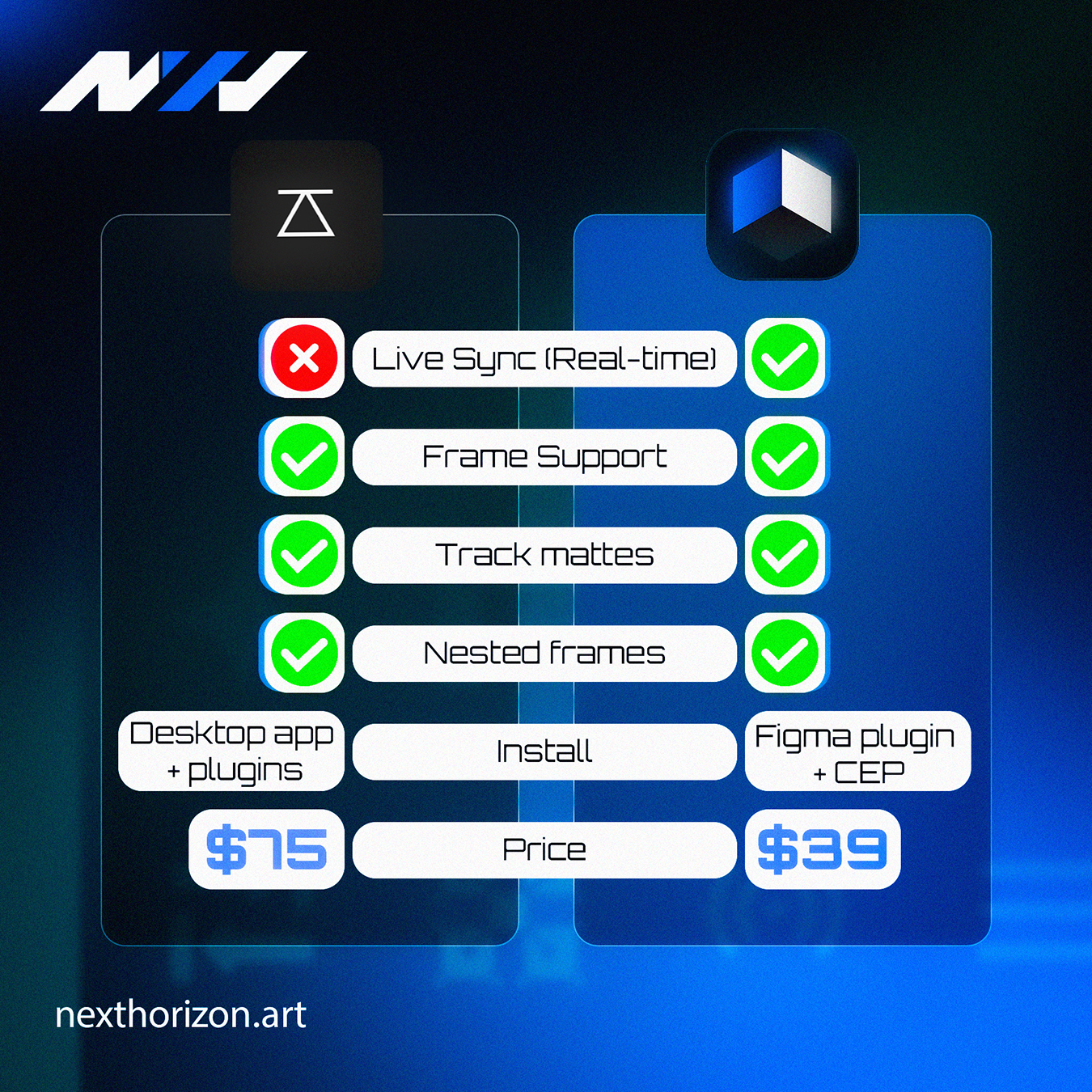
Prism starts at $39, and with live sync now part of the plugin, the value proposition is considerably stronger. Before this update, it was already a solid tool for importing Figma assets into After Effects with clean layer structure. Now it is something you can keep running throughout an entire project, not just at the start.
For context, I have seen motion designers lose hours every week on manual re-imports and asset relinking. If live sync saves you even two or three hours on a single project, the plugin has already paid for itself. That is not a stretch at all.
The question is not really "is it worth it." The question is why you would keep doing things the hard way when the fix is this accessible. You can grab Prism directly from the Next Horizon store, where it starts at $39.
Any downsides to mention?
A couple of honest notes. Live sync works best on stable internet connections, which sounds obvious but matters if you are working from a coffee shop on a slow connection. Also, if your Figma file is massive and complex, syncing can take a moment longer than you expect. Neither of these are dealbreakers. Just things to know going in.
Should I update Prism right now or wait?
Update it now. There is no good reason to wait. Live sync is not a beta feature you stress-test on a client project. It is a real, working addition that makes the tool more useful for day-to-day production. The update is there. Use it.
If you are not using Prism yet and you do any Figma-to-AE work, this is a good moment to start. The live sync feature alone makes it worth trying, especially at that price point. And if you are working on a bigger motion project and want a team behind you, we are always happy to talk at Next Horizon.
Frequently Asked Questions
What is live sync in the Prism plugin?
Live sync in Prism keeps your Figma designs connected to After Effects in real time. When a design changes in Figma, Prism updates the corresponding assets in your AE project automatically, so you do not have to manually re-import files every time something gets updated.
How much does Prism plugin cost?
Prism starts at $39 and is available through the Next Horizon store. Given that it now includes live sync between Figma and After Effects, the price is reasonable for anyone doing regular UI animation or product demo work.
Does live sync in Prism break existing After Effects animations?
No, live sync is designed to update your assets and content without destroying your existing animation structure. Your keyframes and layer logic stay intact. That said, consistent layer naming in Figma helps the sync work more reliably across larger or more complex projects.
Is Prism only useful for UI animation or product demos?
Prism is most powerful for anyone animating work that originates in Figma, which typically means UI flows, app demos, SaaS product videos, and onboarding animations. If your workflow does not involve Figma at all, it is less relevant, but for Figma-heavy pipelines it is genuinely useful.
Do I need a strong internet connection to use live sync in Prism?
Yes, a stable connection helps. Live sync pushes changes from Figma to After Effects over the internet, so a slow or unstable connection can cause delays in how quickly updates appear in your comp. For most studio or home office setups this is not a problem.