1. It Solves the Most Annoying Part of Motion Design
The Prism plugin for After Effects and Figma does one thing most tools ignore: it transfers your Figma designs directly into After Effects while keeping the structure intact. Layers stay named, groups stay grouped, and you are not rebuilding everything from scratch just to start animating. That alone is worth the price of entry.
Anyone who has done motion design for more than a few months knows the pain. You spend an hour in Figma building a clean UI layout, and then you open After Effects and spend another two hours manually recreating the same thing because copy-paste between the two apps is basically useless. It is one of those frustrations that sounds small until it happens on a deadline at 11pm.
Prism cuts that rebuild time down dramatically. You bring the design over, it lands properly, and you start animating. That is it. Simple idea, but the execution is what matters here.
2. The Learning Curve Is Actually Manageable
A lot of plugins for After Effects look powerful in the demo video and then destroy your afternoon when you try to use them on a real project. Prism is not like that. The workflow is straightforward enough that you can figure it out without watching six tutorial videos first.
That said, there is still a setup process and a few things worth understanding before your first real project. Things like how it handles components, how text layers come through, and what happens with auto-layout. Nothing scary, just worth knowing upfront.
If you want to see the full workflow before committing to anything, that video above walks through exactly how Prism moves your Figma work into After Effects. Watching it once before your first project will save you a lot of guesswork.
3. It Respects How Motion Designers Actually Think
Most tools are built by developers who understand software but have never sat down and animated a 60-second product explainer for a client who changed the brief three times. Prism feels like it was built by people who have actually done the work.
The best tools do not make you adapt to them. They fit into the way you already think.
The layer naming conventions, the way groups translate, the ability to keep your Figma file as the source of truth and just re-import when things change. These are not random features. They are answers to real problems that come up on real projects.
I have worked on enough motion projects to know that the tools that stick around are the ones that feel invisible. You stop thinking about the tool and start thinking about the animation. Prism gets close to that.
4. The Price Is Honest
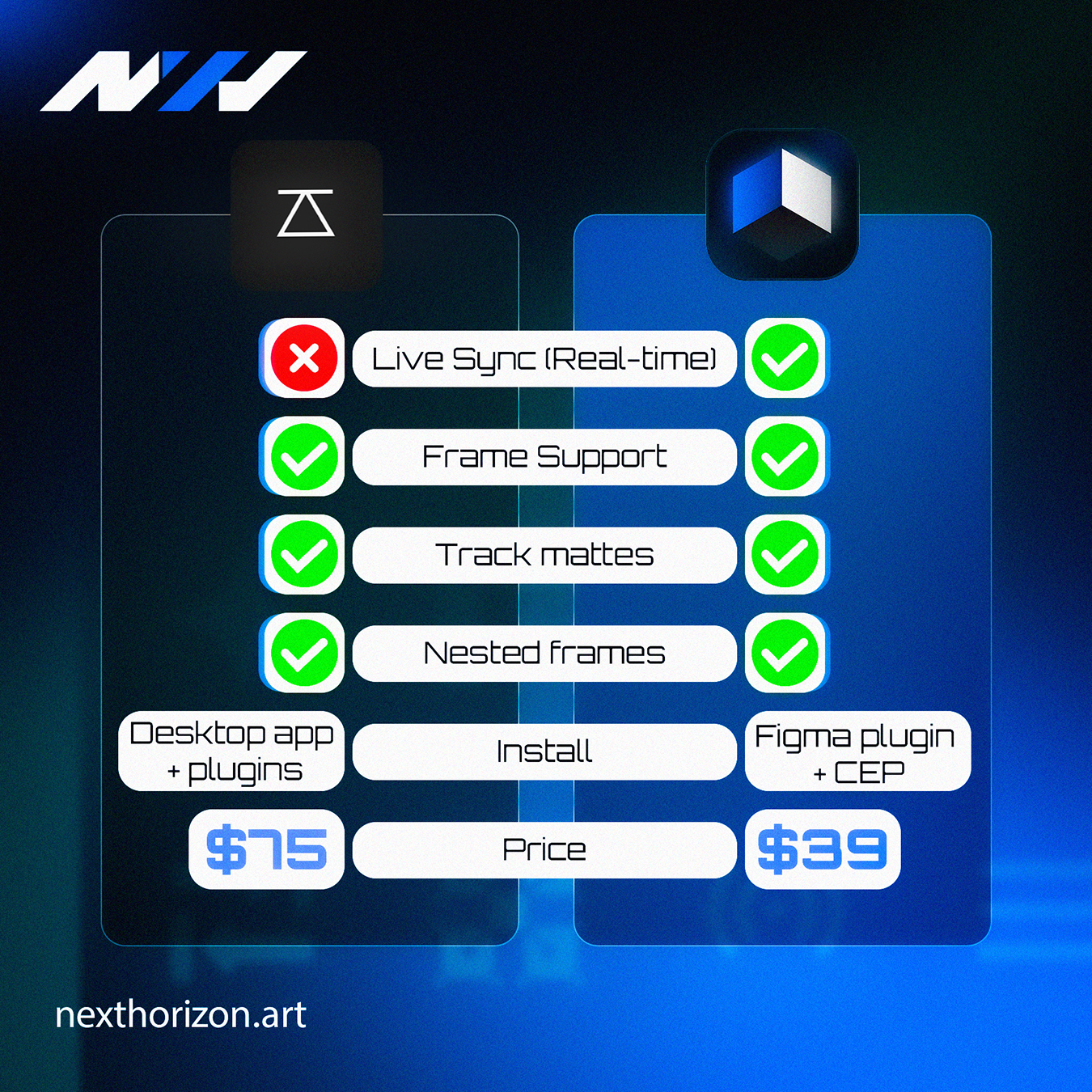
Prism starts at $39. You can check the current pricing and what each tier includes at the Prism store page. For what it does, that is a straightforward investment, not a subscription that quietly drains your card every month for tools you forgot you were paying for.
Pricing in the plugin world can be all over the place. Some tools charge monthly for something you will use three times a year. Others bundle things you will never touch into a tier you are forced to buy. The fact that Prism has a clear entry point at $39 makes the decision easier to think through.
If you are a freelancer or a small studio, that kind of pricing transparency matters. You know what you are getting, you know what you are paying, and you can make a sensible call.
5. 10 Users Is a Starting Point, Not a Ceiling
Reaching 10 users might sound modest if you are thinking in startup metrics. But for a specialized plugin built specifically for the Figma to After Effects workflow, 10 real users who are using it on real projects is meaningful. These are not free trial signups. These are people who decided this tool was worth their money and their workflow.
Early users of niche tools shape what those tools become. The feedback that comes in from the first 10, 20, 50 users is what determines whether a plugin becomes genuinely useful or just another thing that looked good in a YouTube thumbnail.
If you want to see the kind of motion work that comes out of a tight Figma-to-After-Effects workflow, our portfolio has some good examples of projects where that pipeline made a real difference.
Prism plugin After Effects Figma support is also growing, which means the bugs that show up get fixed faster and the features people actually ask for have a better chance of landing in future updates. Getting in early on a tool like this has real upside.
Frequently Asked Questions
What does the Prism plugin do for After Effects and Figma?
Prism transfers your Figma designs directly into After Effects with the layer structure intact. Instead of rebuilding your UI or graphic layouts manually inside After Effects, Prism brings everything over with names and groups preserved so you can start animating right away.
How much does the Prism plugin cost?
Prism starts at $39. You can check the exact tiers and what each one includes on the official store page at nexthorizon.art. Pricing can change over time so always confirm directly on the product page before purchasing.
Is Prism plugin worth it for freelance motion designers?
For freelancers who regularly move between Figma and After Effects, Prism is worth considering. It eliminates the manual layer rebuilding process that eats into project time. At $39 entry pricing, the time saved on even one medium-complexity project makes it a reasonable investment.
Does Prism plugin work with Figma components and auto-layout?
Prism handles Figma layer structure including groups and naming conventions. For specific behavior around components and auto-layout, it is worth checking the documentation or watching the official tutorial video before using it on a complex project for the first time.
What is the difference between importing Figma to After Effects manually versus using Prism?
Manual import usually means screenshotting or redrawing elements inside After Effects, which can take hours. Prism automates the transfer and keeps layer organization intact, so you skip the rebuild entirely and move straight into animation. The difference is most visible on projects with complex, multi-layer UI designs.